Project Overview
A construction company specializing in the design and construction of swimming pools operating multiple construction projects simultaneously across different locations and countries.
They required a centralized, compliant, and easy-to-use digital solution to manage daily site activities, employee working hours, and project documentation directly within Microsoft Teams.
Challenges
Before implementing the solution, the client faced several challenges:
- Manual tracking of employee working hours.
- No standardized daily site reporting process
- Difficulty managing project-specific documents and photos
- Lack of country-based working hour compliance checks
- Fragmented across emails, Excel sheets, and paper reports
- No seamless integration with Microsoft Teams for site users
- Lots of manual work and data entry
They needed a digital, standardized, and compliant construction site reporting solution tightly integrated with Microsoft 365..
Key Objectives
- Automate daily construction site reporting.
- Ensure country-specific labor law compliance.
- Centralize timesheets, tasks, notes, and uploads.
- Generate official PDF reports automatically
- Seamlessly integrate with Microsoft Teams & SharePoint
- Reduce manual errors and administrative effort
Solution
A custom Construction Site App was built using Teams toolkit deployed as:
- Team App
- Automatically added as a tab in the Project Team’s General Channel
- Connected to Project Akte, Each Project Akte automatically creates:
- A dedicated SharePoint Team Site
- A Microsoft Teams Team
- The Construction Site App tab is auto added to the General channel
- Project metadata binding
This ensures one project = one digital workspace, fully automated.
Key Application Pages
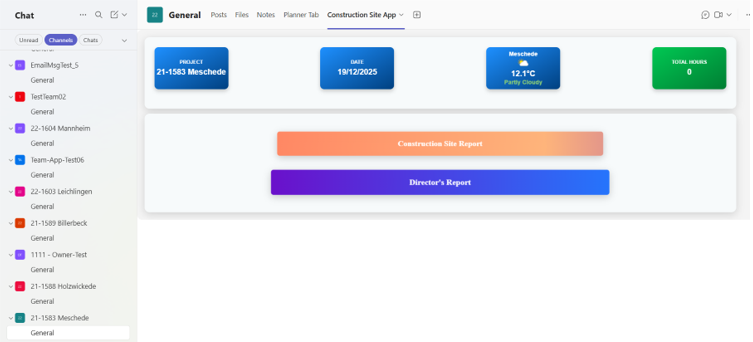
- Landing Page
Purpose: Daily project snapshot & navigation
Features:
- Project details (Project No, Location)
- Date & Weather integration
- Total working hours summary
- Quick access to:
- Construction Site Report
- Director’s Report
- Employee Timesheet Page
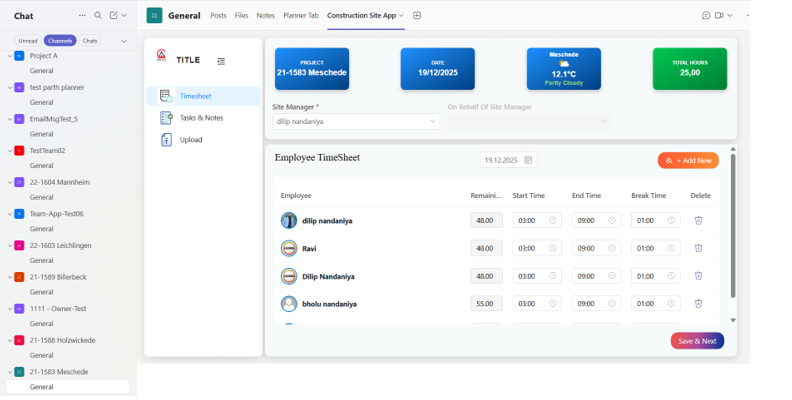
Purpose
Track and validate daily working hours.
Key Features
- Employee-wise time entry
- Add new Employee
- Start Time, End Time, Break Time
- Auto-calculation of
- Total hours
- Remaining allowed hours
- Country-specific working hour validation
- Prevents exceeding legal limits
- Visual indicators for compliance
- Real-time total hours aggregation
Ensures labour law compliance automatically.
- Tasks & Notes Page
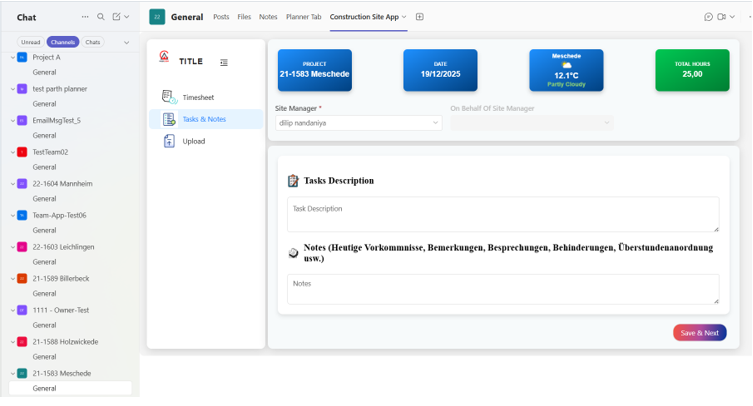
Purpose
Capture daily site activity context.
Key Features
- Task descriptions
- Start Time, End Time, Break Time
- Notes section for
- Issues
- Discussions
- Delays
- Overtime approvals
- Structured data for reporting & audits
- Upload Page
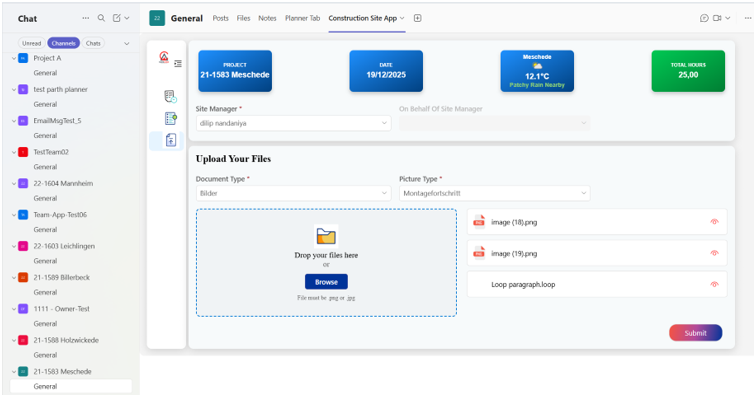
Purpose
Centralized document & photo management.
Key Features
- Upload site photos and documents
- Categorization by:
- Document Type
- Picture Type (e.g., Construction Progress)
- Drag & drop support
- Auto-storage in SharePoint project library
- Preview & Submission
Purpose
Final validation before official submission.
Key Features
- Full report preview before submit
- Auto-generated Construction Site PDF
- PDF includes:
- Employee working hours
- Tasks & notes
- Total site hours
- Submit actions:
- Email PDF to responsible persons
- Save PDF automatically in SharePoint
- Maintain historical records
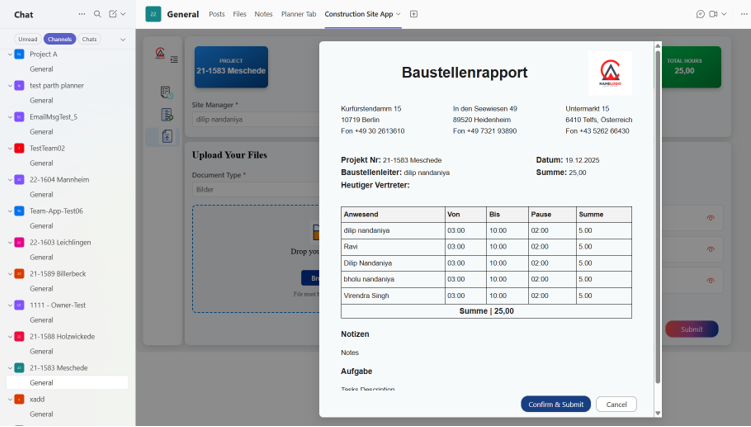
Automated PDF Reporting
- Professionally formatted Construction Site Report
- Generated on submission
- Stored securely in SharePoint
- Sent automatically to
- Project Managers
- Directors
- Responsible stakeholders
Labor Law Compliance Engine
One of the most critical features:
- Configurable country-based working hour rules
- Automatic validation during time entry
- Prevents illegal overtime
- Supports audits and legal compliance
- Reduces HR & legal risk
Business Impact
- 60–70% reduction in daily reporting time
- Eliminated manual calculation errors
- Zero labour-law violations post-implementation
- 100% standardized reporting across projects
- Improved project transparency
- Faster management decisions
- Better collaboration via Microsoft Teams
Conclusion
The Construction Site App transformed how the client manages swimming pool construction projects by bringing people, processes, and data together in one intelligent, automated Microsoft 365 solution.
Technology Stack
- Team Toolkit
- Microsoft Teams (Tab integration)
- SharePoint Online
- Power Automate
- PDF Generation Service