Before We Talk About Next.js, Let’s See How React Handles Routing
When building web apps with React, routing doesn’t come built-in. React is just a UI library, so to handle page navigation, you need to install an external package like React Router.
To set up routing in React, you first install the router package:
npm install react-router-dom
Then you define routes manually using <Routes> and <Route> components:
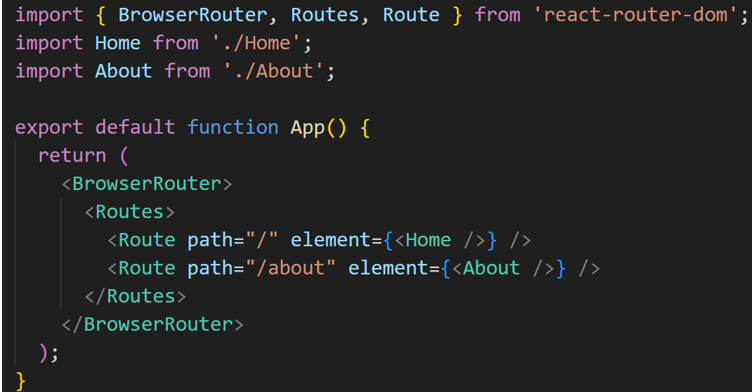
While this works well, it becomes harder to manage as your app grows with nested or dynamic routes.
Next.js Changes That with File-Based Routing
In Next.js, routing is automatic. You don’t need to write any configuration at all.
In the latest App Router (Next.js 13+), the file and folder structure inside your app/ directory defines your routes — this is called file-based routing.
Your folder structure is your route structure.
How File-Based Routing Works in the App Router
If you create this folder structure:
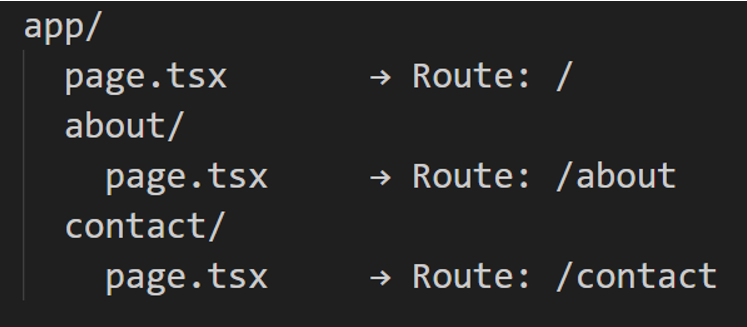
Next.js automatically maps:
- / -> app/page.tsx
- /about -> app/about/page.tsx
- /contact -> app/contact/page.tsx
The page.tsx file is required at each level — it’s the actual component that gets rendered for that route.
Dynamic Routes Made It Easy
Let’s say you want to build a blog where each blog post has its own unique URL like:
- /blog/hello-world
- /blog/learn-nextjs
- /blog/react-hooks
You can do this using a dynamic route in the app/ folder.
Folder Structure:
Create folders and files like this:
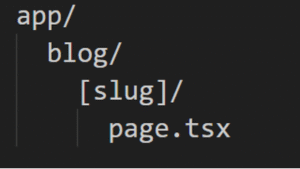
Here, [slug] is a dynamic segment. It will match anything that comes after /blog/.
You can access [slug] like this :
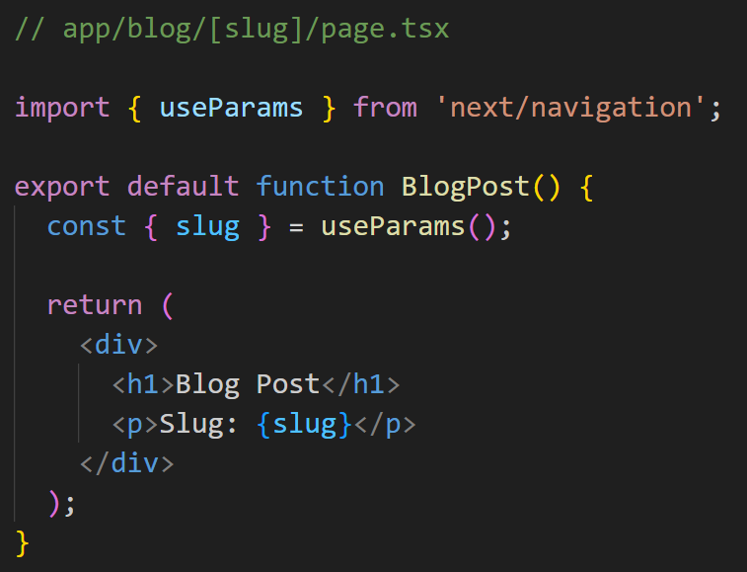
If you visit /blog/hello-world, you’ll see blog post on Slug: hello-world
This allows you to build dynamic pages like blogs, product details, user profiles, and more — all using folders and file names.
Nested Routing and Shared Layouts
App Router supports nested layouts — so you can define a layout once and reuse it for all child routes.
Example:
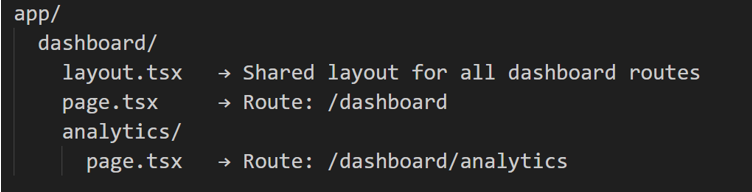
layout.tsx acts as a wrapper for all nested pages under /dashboard.
Example:
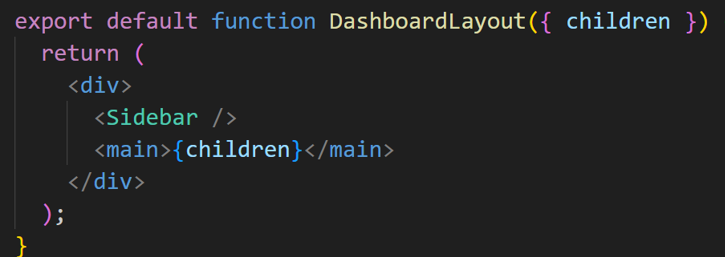
This makes complex apps scalable and DRY.
Loading UI and Error Handling
Next.js App Router also supports special files at any route level:
- tsx - Shows a loading state while fetching
- tsx - Catches and displays route-level errors
- not-found.tsx - Handles 404 for a route
For Example:
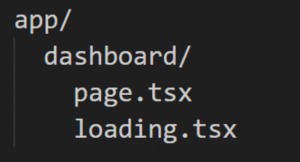
This shows a loading screen while /dashboard is fetching or rendering.
Built-in API Routes (Still in /pages/api)
Even with the App Router, backend APIs are still created using:
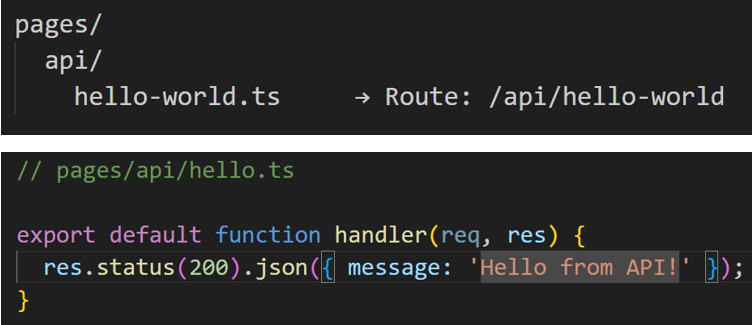
This allows you to create serverless functions inside single (not need to separate frontend or backend) project — great for forms, auth, or database operations.
Default Files and Folders in App Router Projects
Here’s what a typical Next.js project using App Router looks like:
- app/ -- Root directory (All your routes live here)
- app/layout.tsx -- Root layout (HTML structure for the whole app)
- app/page.tsx -- Home page (/)
- app/globals.css -- Global styles
- public/ -- Static assets like images
- config.js -- App configuration
- app/api/ -- API routes (serverless functions)
Special Folder/File Prefixes in App Router
Next.js also supports special folder naming conventions to handle advanced routing logic:
- (folder) -- Groups routes without affecting the URL path
- @folder -- Marks a parallel route segment (used for layouts with tabs, etc.)
- _folder -- Used to prefix folders that shouldn't be treated as routes (custom logic)
- (.folder) -- Intercept from same level
- (…folder) -- Intercept from the root (/app)
Conclusion
The Next.js App Router takes everything great about file-based routing and brings it to the next level:
- Auto-generated routes from folders
- Shared layouts and nested routing
- Built-in loading, error, and 404 handling
- Cleaner and more scalable architecture
It helps you build full-featured apps with less boilerplate and better structure — right out of the box.
-
The Vibrant World of Leisure Activities
The Vibrant World of Leisure Activities In today’s fast-paced society, finding time for leisure activities is becoming increasingly...
-
How file-based routing works in Next.js
Build full-featured apps with less boilerplate and better structure...
-